Questions about using your PSMail account and correcting issues related to specific services (i.e. “Accessing PSVPN through a proxy” “Why are my outgoing messages failing to send from iMail [MAC OS X]?” etc.)
When you receive a very large email (over 5 MB, for example), the process to download it can take a long time, especially if your Internet connection is slow. Aside from forcing you to wait to read the message, this can cause problems with your inbox as it clogs things up and monopolizes your computer’s attention. Occasionally, your inbox can even freeze, locking up the downloading process and forcing you to start again. In order to address this, PSMail introduced archiving, an option where a large message intended for you can be saved on our system and accessed directly through a link. This prevents the long download times and protects your inbox from a large message that could take up an inordinate amount of space. Continue reading What is archived email and how can I access it?
How to Manage Your Email Quota (IMAP & Webmail Users)
Managing your email quota is essential to ensure you can continue sending and receiving messages without interruption. This guide explains practical steps for both IMAP users (such as Outlook) and webmail users to help keep your mailbox size under control.
Why Quota Management Matters
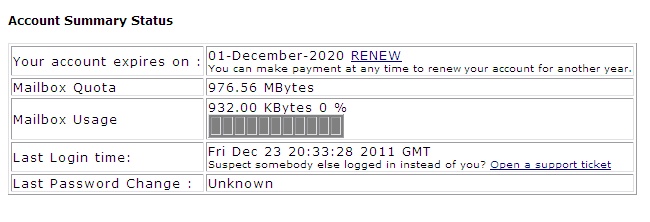
Every email account has a storage limit (quota). When your mailbox exceeds this limit, you may stop receiving new emails or encounter sending issues. To avoid this, it’s best to regularly clean up or move emails and keep your usage below 75% of your total quota.
For IMAP Users (e.g., Outlook)
When using IMAP, your emails are stored on the mail server. Simply organizing messages into folders within your mailbox does not reduce your quota usage. To free up space, you need to move emails to local folders stored on your computer.
Create Local (Personal) Folders
Open Outlook.
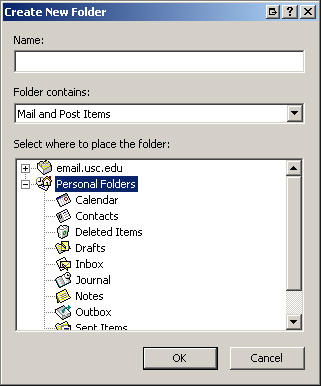
Go to File → New → Folder.
In the window that appears:
Select Personal Folders.
Enter a name (e.g., Archive).
Ensure Mail and Post Items is selected.
Click OK.
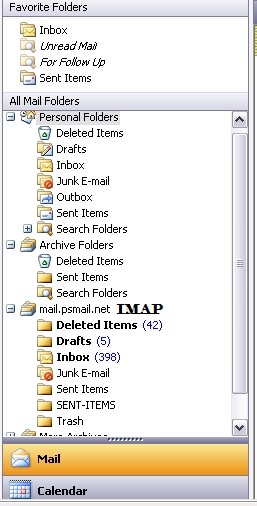
You’ll now see your new folder under Personal Folders, separate from your IMAP folders (which are stored on the server).
Tip: IMAP folders are typically listed under your mail server (e.g., mail.psmail.net), while local folders appear under “Personal Folders.”
Move Emails to Local Storage
To reduce server usage:
Move individual emails:
Drag and drop messages into your local folder, or
Use Edit → Move to Folder
Move entire folders:
Open the IMAP folder
Select any message
Click Edit → Select All
Drag all messages to your local folder or use Move to Folder
Once moved, these emails are stored on your computer and no longer count toward your quota.
For Webmail Users
If you access email through webmail, you can manage your quota directly from the browser.
Find and Remove Large Emails
Log in to webmail.
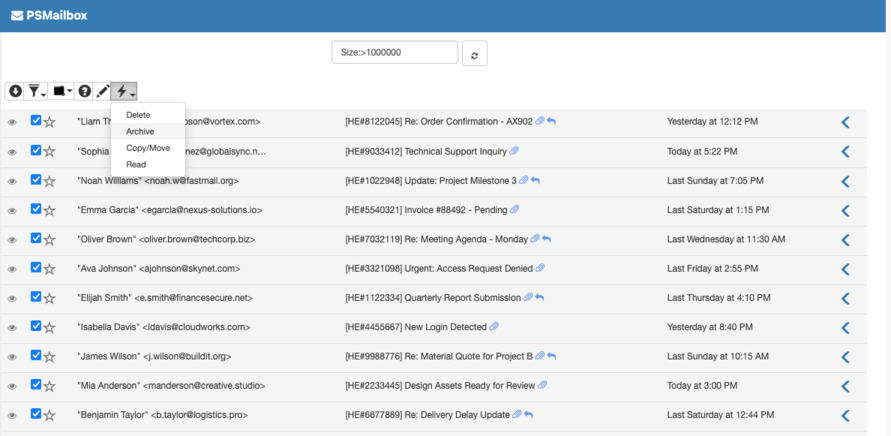
Use the search feature with: "Size:>1000000" This finds emails larger than 10 MB. Learn more about Search
Review the results and:
Download important emails and attachments
Delete unnecessary messages
Use the Archive Feature
If you want to keep emails on the server without affecting your quota:
When PSMail’s SPAM filter identifies a problem message, it does not completely delete it right away. Instead, it removes it from your inbox and “quarantines” it, keeping it safe and harmless until you can confirm that it is indeed SPAM. This prevents important messages that are accidentally identified as SPAM from being inadvertantly deleted. Continue reading How can I get daily (instead of weekly) alerts on emails quarantined by the SPAM filter?
Windows Vista and Windows 7 users sometimes experience trouble connecting to the Internet through their VPN. Though the VPN icon shows “green” (connected), their Internet activity is not actually routing through the secure network. The reason for this is that in order for OpenVPN to route traffic correctly, users must run it as an administrator. The following are several solutions for correcting this issue and simplifying the use of OpenVPN. Continue reading Why is my VPN not routing my internet traffic even though it says that I’m connected?
Often this indicates a problem with your settings either after a recent software update or from a plugin software like antivirus. Follow these steps to ensure that your account is set up correctly. On a Mac, it is also highly recommended that you DISABLE “automatically manage connection settings” option. As this settings can reset your outgoing settings to a non-work default values.
One problem that arises with spam filters and blockers is that legitimate emails are sometimes accidentally identified as spam. This article explains how to prevent your outgoing mailings, such as newsletters or PSMail List emails, from being blocked by your recipients’ spam filters. If you have questions about accidentally blocked incoming messages, please follow this link.
PSWeb is a web tool included with every PSMail subscription. It helps you create online image libraries, newsletters, and simple webpages. Read more for further information and for setup instructions.
Social media sites such as Twitter, Facebook, and YouTube have grown increasingly popular. They are now used by millions to stay closely connected with friends and family, even across great distances. In some situations, however, access to these services is restricted or unsafe because of security concerns. Continue reading How can PSMail help me access social media?